Live Endpoints
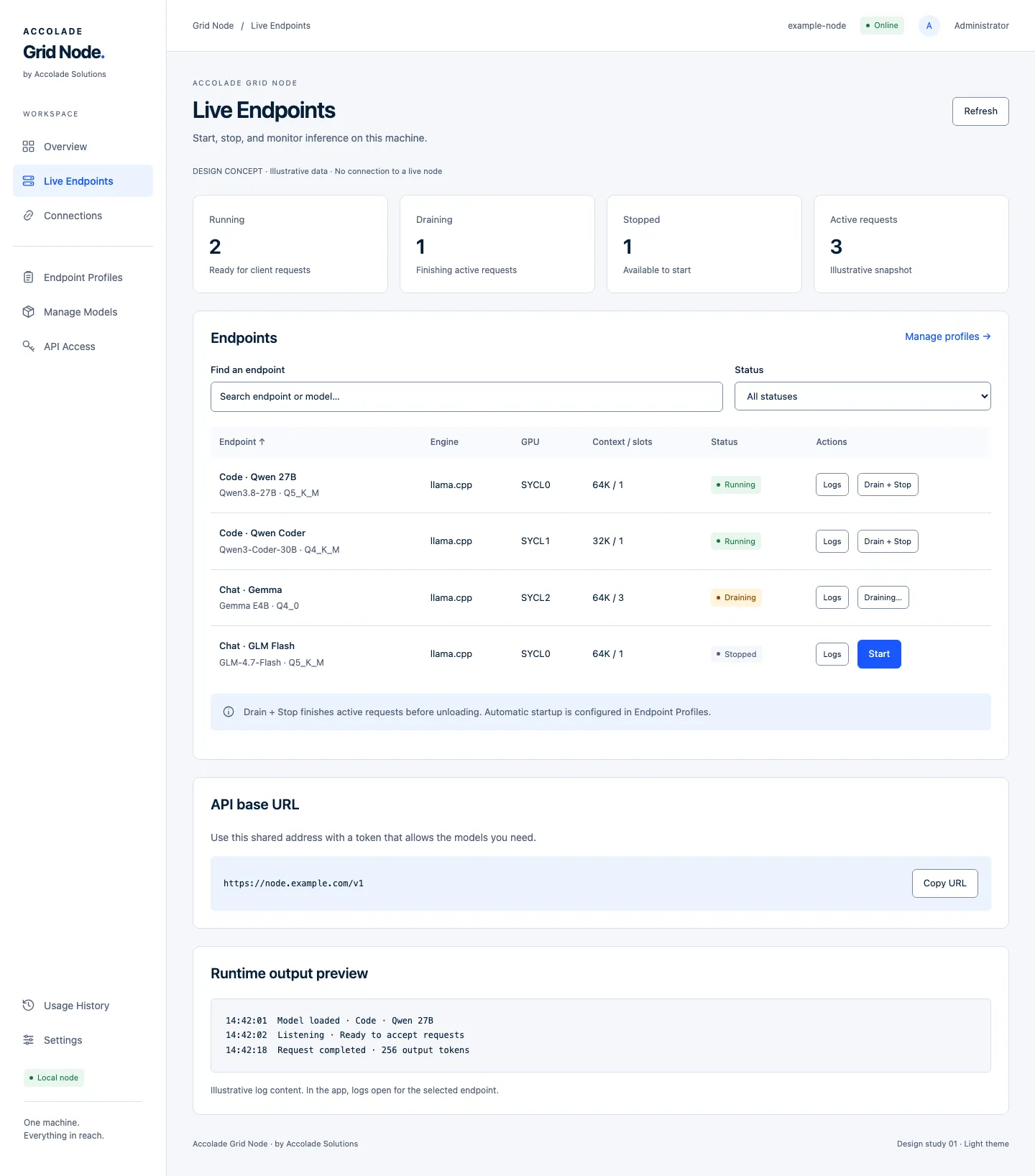
Start endpoints, drain active requests before stopping, and inspect bounded runtime logs. See running, starting, stopped, and failed states.
THE FOUNDATION OF ACCOLADE GRID
Run models. Manage endpoints.
Keep control of your infrastructure.
A container application for the engineers operating AI and the teams relying on it—all from one clear interface.
FROM MODEL TO CLIENT
Keep the model, its launch configuration, and client access clearly organized.
Add a model from your mounted storage or download a supported model file.
Choose the runtime, GPU placement, context, and concurrency for your workload.
Bring the profile online. Check its status and logs before connecting a client.
Create a scoped token and use the connection details for your application.
BUILT AROUND DAILY OPERATIONS
Manage this machine’s model services through a focused set of connected views.
Start endpoints, drain active requests before stopping, and inspect bounded runtime logs. See running, starting, stopped, and failed states.
Save runtime selection, GPU placement, context, and concurrency. Keep launch configuration separate from lifecycle controls.
Register model files, manage downloads and variants, and record capability evidence. Keep declared support distinct from operator-tested behavior.
Find client setup instructions and create scoped inference tokens. Limit endpoint access, set expiration, and revoke tokens when they’re no longer needed.
Review requests, errors, latency, and input/output token measurements. Filter by time, model, profile, or GPU; missing measurements remain distinct from zero.
Inspect system status, select allowed GPUs, manage the local administrator account, and export or restore configuration backups.
RUNTIME COMPATIBILITY
Grid Node separates model operations from runtime execution. Choose a compatible engine and recipe for the hardware and model you actually have.
Support depends on the model architecture, format, quantization, runtime build, and available memory.
Run supported GGUF models using a matching backend runtime. Deployment examples cover Intel SYCL and NVIDIA CUDA.
Context and concurrency still need to fit your hardware.
Opt-in execution for qualified GGUF models and prepared Flash-Next NVFP4 checkpoints. Requires a separately configured host controller and approved runtime recipe.
CUDA recipe support is limited; Intel vLLM is excluded. Not every model or GPU combination is qualified.
GETTING STARTED
Start with a Linux host, Docker Engine and Compose, compatible GPU drivers, and enough memory and storage for your chosen model.
Installation requires access to the Grid Node container package and matching deployment files. Public download documentation is not available yet.
Use the Intel SYCL or NVIDIA CUDA Compose file supplied with your release. Configure model storage, runtime image, device access, and persistent configuration.
From your configured deployment directory:
docker compose config --quiet
docker compose pull
docker compose up -d
docker compose logs --tail=50 local-service
Private packages require authorized registry access. These commands assume your supplied file is named compose.yaml.
Access the service through its configured local address or an SSH tunnel. Use the first-use setup token from the container logs to create the administrator account. Select your allowed GPUs, then register a model.
Continue with the model workflowA FEW PRACTICAL ANSWERS
Grid Node manages model services on one machine. Fleet-wide management is planned for Grid Console and is not included in the current Node application.
No. Compatibility depends on the runtime recipe, architecture, format, quantization, GPU support, and memory. Model registration does not prove that the model can run. Qualify your intended workload before relying on it.
Use the Connections view to select a shared or endpoint-specific inference URL. Create an API token with the required scopes and endpoint permissions. Supported API behavior depends on the runtime and model.
Saved configuration and persistent usage history are distinct from runtime state. Bounded logs and live runtime counters are held in memory. Back up configuration separately; configuration exports do not contain model weights.
No. Provider integrations are planned for Grid Connectors. They are part of the Accolade Grid direction, not current Grid Node functionality.
YOUR FIRST NODE
Review the requirements. Bring your first endpoint online.